Name one change
Specify the object, surface, background or lighting to edit. Start with one task so you can see which instruction worked.
Free prompt builder · no signup
Describe what should change, what must stay, and how the result should look. Copy the prompt into your image-to-image editor.
This tool builds text in your browser. It does not generate images or upload photos.
Your starting prompt
Copy first, then paste into your chosen editor. These are instruction templates, not tested guarantees. A generative edit can change details you asked to preserve.
The linked editor is operated by this guide’s author. One-time edit packs are available; current prices and trial availability are shown on its pricing page.
Specify the object, surface, background or lighting to edit. Start with one task so you can see which instruction worked.
Name the shape, material, layout, text or camera angle that matters. “Keep everything” is harder to inspect than a concrete list.
Compare each preservation instruction with the original. A plausible-looking result can still change a product or a room.
One request · one output
We used the chair prompt above in the Image to Image editor with its Studio photo preset on October 10, 2026. These are the actual input and AI output, resized for display. This is an operator-produced example.
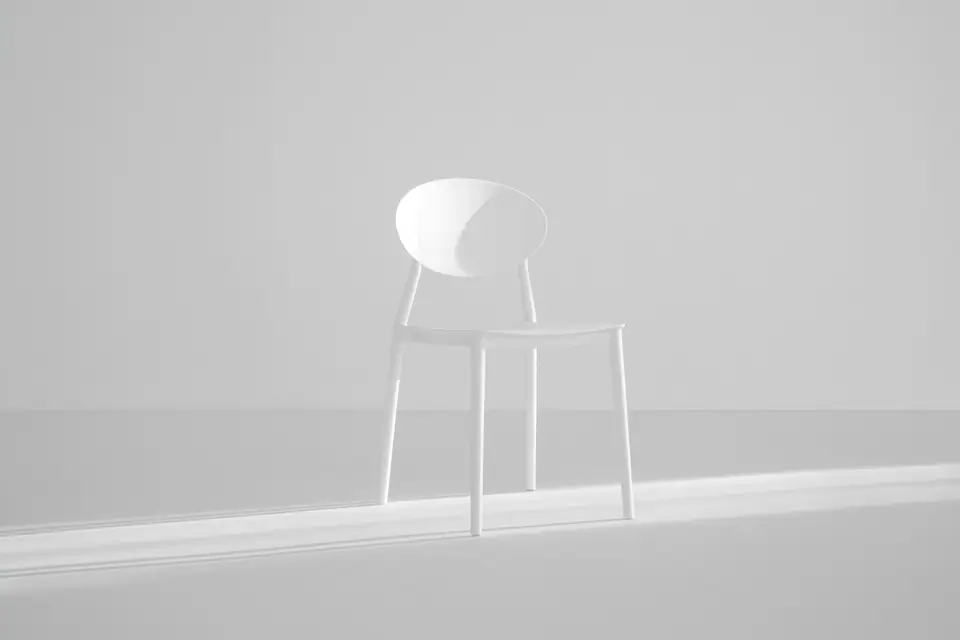
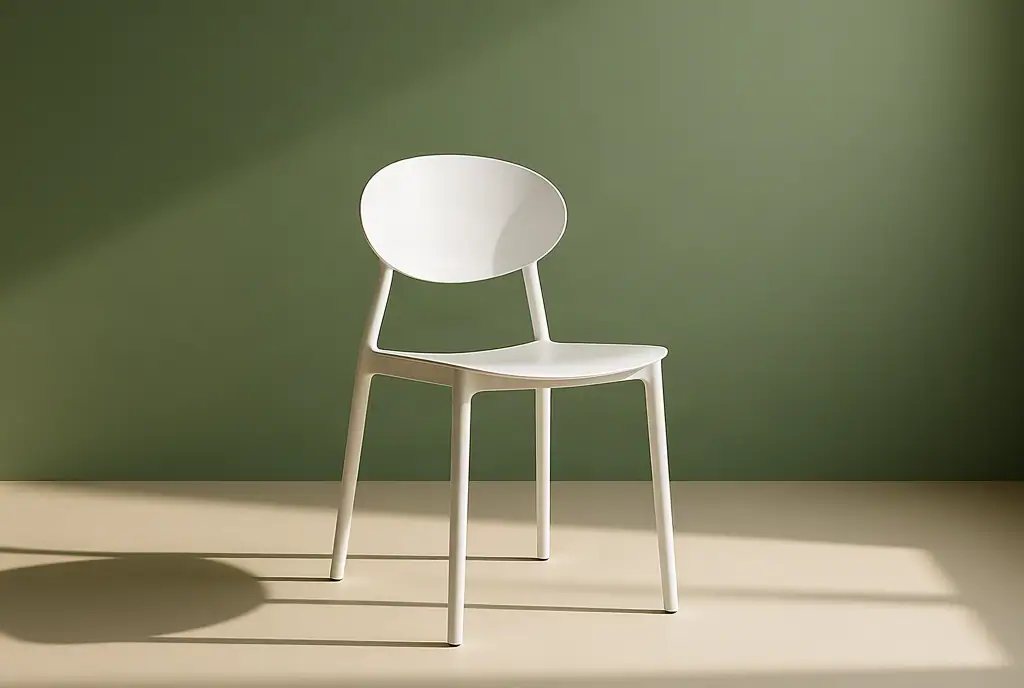
The backdrop and lighting changed as requested. The framing, seat edge and leg details also changed, despite the preservation instruction. Use this as a scene concept, and check the real product before publishing a catalogue image.
Original photo: Ellen Qin on Unsplash, under the Unsplash License. The generated output is not original photography. Read the full prompt and preset notes.
If the product must remain pixel-for-pixel identical, a conventional cutout and background editor is a better fit than a generative replacement.
No. The chair example shows that clear instructions can still change the subject. Inspect the actual result, especially product text, edges and repeated patterns.
Use an image-to-image editor that accepts an existing photo and a text instruction. The templates are general starting points. The linked Image to Image editor is one option and is operated by this guide’s author.
No. Only the chair example shown here has a documented input and actual output. The other task templates are suggested starting instructions and have not been presented as tested results.
The builder assembles text locally in your browser. This page has no image upload, generation API or analytics script. Do not put confidential information into prompts you later submit to an external editor.
The linked service prohibits deepfakes, face swapping, face replacement, facial reenactment and impersonation. It also prohibits pornography/NSFW, violence/gore, hate speech, child-unsafe content/CSAM and copyright or trademark infringement. Use only images you have permission to edit. See its content standards.